Update External Product Image Paths

We use an external CDN to host our media files such as images. If we need to change the image path of a single product, it requires exporting the product in excel, changing the path in excel, and importing that excel file back into Americommerce. It would awesome if we can update the file path within the product editors photo menu (image attached)
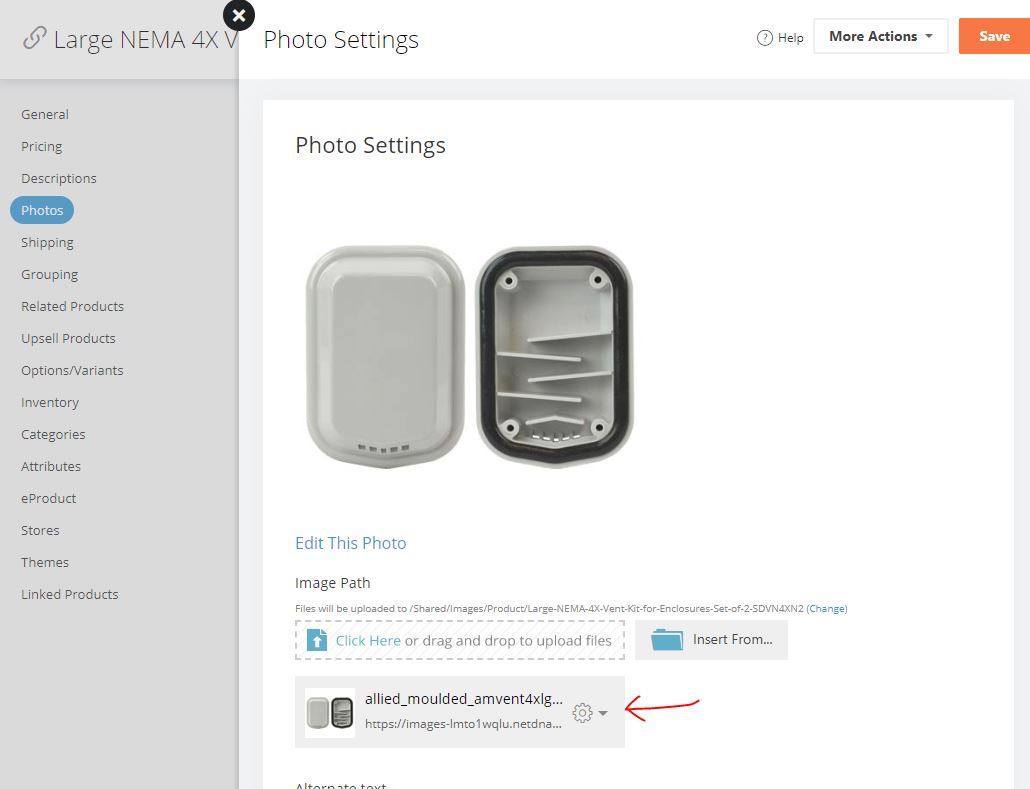
-

Hey Trevor,
If you click on Insert From... there should be a web option where you can place a URL. Is that what you're looking for?
1 -

Currently from my experience, you can replace a product image url in the online interface, but you cannot edit the url.
A simple example, we use CDNs as well and https://storeimages-westcoastclassic.netdna-ssl.com/dc/100022896/100022896_(1)-1028.jpg points to the main to the image of a product, and https://storeimages-westcoastclassic.netdna-ssl.com/thumb/dc/100022896/100022896_(1)-1028.jpg point to the thumbnail of the same image, but if someone accidentally pastes the image address in the thumbnail field in the editor and hits save before they realize it, we cannot just go edit the url to have the /thumb/ in the url, we have to go get the entire correct url and update the entire path.
It would be nice to be able to choose to edit the current url, have it bring up the current url in a text field we could edit, then we could make the change to the url and save the url.
1 -
You both are awesome. Thanks for pointing that out!
0
-1028.jpg)
Please sign in to leave a comment.
Comments
3 comments