UPDATE: The Option To Use DELETE Spreadsheet Function Across Most Import Fields

UPDATE: The option to delete using  is now a pattern across most import fields.
To delete a specific field in an import, you can set as the value for that field. When the import runs, that entity's field will be set to the default value. For example to delete the itemNumber for a product with itemID=1, you would do the following:

When the flag is used for a delimited list field, all items previously contained in that field will be deleted. For example if a product with ID=1 has multiple ItemImages set, using the flag on that field will result in all ItemImages being deleted:

Fields That Cannot Be Deleted:
Some fields cannot be deleted. Any field marked as required on the import mapping page cannot be deleted and the import will not process that row if a required field has the flag. True/False fields as well as ID fields are also not eligible for the  flag.
flag.
For example trying to delete the itemName field would be an invalid import since itemName is a required field for product. Trying to delete the itemID or Hide flag would also result in an invalid import:


(Any field with a * next to its name on the mapping page cannot be deleted)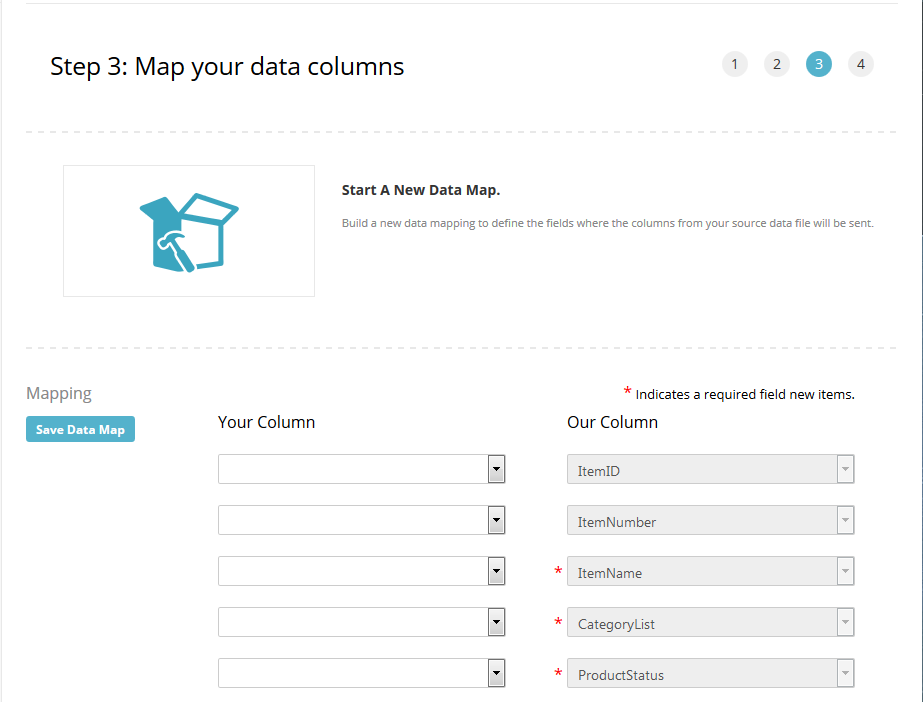
Specific cases that currently cannot be deleted
- All Tracking Import fields
- Customer RegisteredDate
- Product ShippingAdjustments
- Product Size Unit
- Product Weight Unit
Please sign in to leave a comment.
Comments
0 comments