FEATURE: 2014.3 - Browse By Category Widget Now Supports Auto Generated Flyout Menus

The Browse By Category Widget now supports auto generated flyout menus.
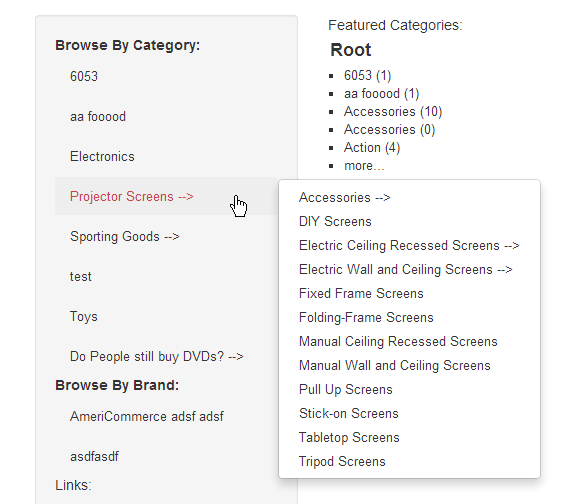
It can support a lot of levels:

And is also supported with drilldown:

And is supported by older V2 themes (see notes):
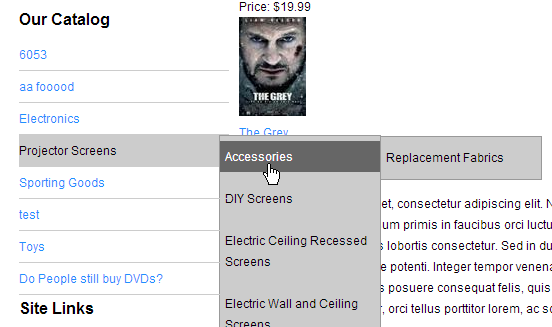
Now for the gotchas: It will need a new layout to work in R3V themes + some added CSS (this will be added in to the default themes) This is similar to how the Menu widgets work:
HTML:
<ac:visibilityarea id="dvControl">
<ul class="nav nav-stacked nav-pills">
<li><strong>$$HEADER$$</strong></li>
<ac:layoutarea id="Item">
<ac:visibilityarea id="WithoutSubCats">
<li>
<a class="category-link" href="$$CATEGORYHREF$$">
<!--$$CATEGORYICON$$-->
$$CATEGORYNAME$$
</a>
</li>
</ac:visibilityarea>
<ac:visibilityarea id="WithSubCats">
<li class="dropdown">
<a class="category-link" href="$$CATEGORYHREF$$">
<!--$$CATEGORYICON$$-->
$$CATEGORYNAME$$ -->
</a>
<ac:visibilityarea id="phSubMenu">
<ul class="dropdown-menu">$$SUBMENU$$</ul>
</ac:visibilityarea>
</li>
</ac:visibilityarea>
</ac:layoutarea>
</ul>
</ac:visibilityarea>
<ac:layoutarea id="SubMenuItem">
<ac:visibilityarea id="WithoutSubCats">
<li>
<a class="category-link" href="$$CATEGORYHREF$$">
<!--$$CATEGORYICON$$-->
$$CATEGORYNAME$$
</a>
</li>
</ac:visibilityarea>
<ac:visibilityarea id="WithSubCats">
<li class="dropdown">
<a class="category-link" href="$$CATEGORYHREF$$">
<!--$$CATEGORYICON$$-->
$$CATEGORYNAME$$ -->
</a>
<ul class="dropdown-menu">$$SUBMENU$$</ul>
</li>
</ac:visibilityarea>
</ac:layoutarea>
CSS:
.nav-stacked > .dropdown:hover > .dropdown-menu { display:block; top:0; left:100%; }
.nav-stacked > .dropdown:hover > .dropdown-menu li { position:relative; }
.nav-stacked > .dropdown:hover > .dropdown-menu li:hover > .dropdown-menu { display:block; top:-8px; left:100%; }
For older V2 themes the layout will be generated the same way old Vertical LinkGroup widgets were and the following css would need to be modified to something like this (highlighted text would need to be added, all the rest should already be there or atleast something close.):
.LinkGroup .ControlLink,
.CategoryNavigationLinks .ControlLink { padding: 5px 0; border-bottom: 1px solid #ccc; z-index: 10; position: relative; }
.LinkGroup .ControlLink:hover,
.LinkGroup .ControlLinkHover,
.LinkGroup .ControlLink:hover > a,
.LinkGroup .ControlLinkHover > a,
.CategoryNavigationLinks .ControlLink:hover,
.CategoryNavigationLinks .ControlLinkHover,
.CategoryNavigationLinks .ControlLink:hover > a,
.CategoryNavigationLinks .ControlLinkHover > a { color: #000; background: #ccc; text-decoration: none; }
Please sign in to leave a comment.
Comments
0 comments